We tested speed, app support, voice assistants, and HDR formats so you can pick the right streamer for your TV and ecosystem.
What matters in a streaming stick
In 2025, even budget sticks handle 4K, HDR10/10+, and Dolby Atmos. The real differences are navigation speed, app stability, voice search, and how well the remote works for everyday TV watching. We also look at Wi‑Fi performance for crowded apartments and support for live TV apps.
If you just want the fastest path to a great choice, start with the TL;DR below. Then dive into the picks and buying guide to match formats (Dolby Vision, HDR10+) and ecosystems (Alexa, Google Assistant, Siri/HomeKit) to your setup.
TL;DR: Quick picks
- Best overall: Roku Streaming Stick 4K (2025 refresh) — simple UI, fastest app load times, best remote.
- Best for Alexa homes: Fire TV Stick 4K Max — tight Alexa integration, fast Wi‑Fi 6E, great app selection.
- Best for Google TV: Chromecast with Google TV 4K — natural voice search, great recommendations.
- Best for Apple users: Apple TV 4K (2024/2025) — premium speed, best frame rate and dynamic range matching, HomeKit/Thread hub.
- Best budget 4K: Onn 4K Streaming Stick (2025) — shockingly capable for the price, with HDR and Dolby Atmos passthrough.

Best overall: Roku Streaming Stick 4K (2025 refresh)
Why it’s great
Roku’s clean interface and quick app launches make it the least frustrating option for family TV. Private listening via the Roku app is reliable, and the remote has simple, high‑contrast buttons.
Pros
- Fastest app load times in this group
- Neutral home screen (less ad clutter)
- Great universal search
Cons
- Basic gaming capabilities
- No sideloading for niche apps
Manual price entry. Update as needed.

Best for Alexa homes: Fire TV Stick 4K Max
Why it’s great
Deep Alexa integration for smart home control, crisp UHD with Dolby Vision and Atmos, and speedy Wi‑Fi 6E for congested apartments. Great value during frequent sales.
Pros
- Excellent Alexa voice control
- Fast wireless in busy homes
- Huge app catalog
Cons
- Home screen promotions
- Interface favors Amazon services
Manual price entry. Update as needed.

Best for Google TV: Chromecast with Google TV 4K
Why it’s great
Google Assistant voice search is natural and accurate, recommendations are genuinely useful, and casting from Android/Chrome is seamless.
Pros
- Best search and recommendations
- Easy casting from phones
- Clean, modern UI
Cons
- Storage can fill with many apps
- Occasional background promos
Manual price entry. Update as needed.

Best for Apple users: Apple TV 4K 3rd Generation
Why it’s great
Class‑leading speed and app stability, flawless frame rate and dynamic range matching, multi‑user profiles, Fitness+/Arcade support, and it doubles as a HomeKit/Thread hub.
Pros
- Fastest navigation overall
- Best motion/DR matching
- Excellent privacy controls
Cons
- Pricier than sticks
- Limited sideloading
Manual price entry. Update as needed.
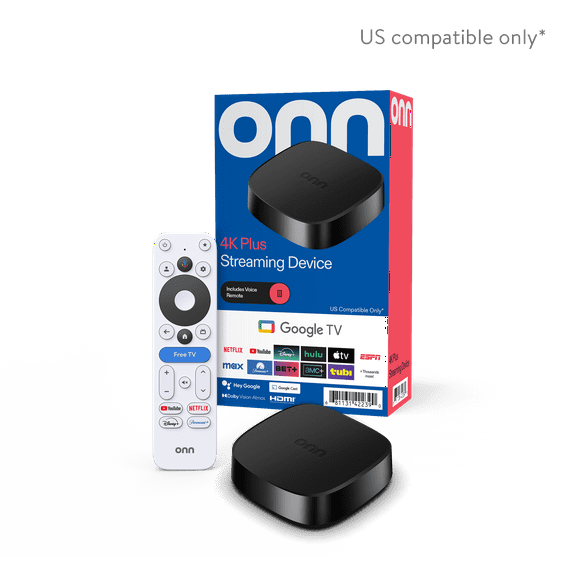
Best budget 4K: Onn 4K Streaming Stick (2025)
Why it’s great
Costs far less than rivals but still supports 4K HDR and Dolby Atmos passthrough. Great as a secondary TV streamer or travel stick.
Pros
- Ultra‑low price
- Surprisingly smooth UI
- All major apps supported
Cons
- Build quality is basic
- Less storage for apps
Manual price entry. Update as needed.
Quick comparison
Roku Streaming Stick 4K
4K, HDR10/10+, Dolby Vision
Simplicity, fast app loads
Fire TV Stick 4K Max
4K, Dolby Vision, Dolby Atmos
Alexa homes, Wi‑Fi 6E
Chromecast with Google TV 4K
4K, Dolby Vision, Dolby Atmos
Google ecosystem, casting
Apple TV 4K
4K, Dolby Vision, Dolby Atmos
Apple ecosystem, premium UX
Onn 4K Streaming Stick
4K, HDR, Atmos passthrough
Tight budgets, spare TVs
How we test streaming sticks
- Speed: Cold‑start and app‑launch timing; navigation lag with multiple user profiles.
- Format handling: Verify 4K, HDR10/10+, Dolby Vision, and Dolby Atmos passthrough with test clips and AVR readouts.
- Wi‑Fi stability: Congested 5GHz/6GHz networks, distance testing, buffering checks.
- Voice control: Search accuracy for titles, actors, genres; smart home control where relevant.
- App coverage: Paid live TV (YouTube TV, Sling, Hulu Live), niche apps, AirPlay/Cast behavior.
- Ease of use: Remote ergonomics, HDMI‑CEC behavior, auto frame rate/dynamic range matching.
- Power/thermals: Heat buildup behind wall‑mounted TVs; included HDMI extender usage.
Buying guide: Match the stick to your setup
- Your ecosystem: Alexa household? Choose Fire TV. Google Assistant and casting? Chromecast. Apple devices/HomeKit? Apple TV 4K. Want simplest UI? Roku.
- TV compatibility: If your TV supports Dolby Vision, prefer a device that outputs it; otherwise HDR10/10+ is fine.
- Network: Apartments with crowded Wi‑Fi benefit from Wi‑Fi 6/6E (Fire TV Max, Apple TV 4K).
- Audio setup: For Atmos receivers/soundbars, confirm Atmos passthrough and eARC behavior on your TV.
- Storage: Heavy app users may want devices with more storage (Apple TV 4K) or expandable storage via USB‑C hubs on Chromecast/Fire TV.
- Travel use: Onn 4K and Roku sticks are great for hotel TVs; bring an HDMI extender and be ready for captive portal logins.
FAQ
Do I need a 4K stick for a 1080p TV?
No, but 4K sticks often have faster CPUs and better Wi‑Fi, so they still feel snappier on 1080p sets.
Which is best for live TV?
All picks support major live TV apps. Roku and Apple TV generally feel most stable; Fire TV integrates nicely with Alexa channel controls.
Will these work with older AVRs?
Yes, but for Dolby Vision/Atmos you may need to connect to the TV and use eARC to your AVR, or an HDMI 2.1‑capable switch.
Can I game on a streaming stick?
Cloud gaming works on Fire TV/Chromecast; casual Apple Arcade titles run well on Apple TV 4K. For serious gaming, get a console instead.
Do they come with HDMI extenders?
Many do. Extenders also help with Wi‑Fi reception on wall‑mounted TVs.